Ten cars, each with one fault. You get what an owner would see and nothing else. For each car, name the box, the part and the one change that fixes it.
As a pair, one of you reads the car out and the other plays the expert; swap for the next car. Stuck? Open the first hint: it points at the box. The second points at the test. Open the answer last.
A few of these faults aren’t wires. One is a setting and one is a change to the sketch, because real faults are sometimes exactly that.
Car 1 · applies to both modules
Every speed the same
“Every speed is the same speed.”
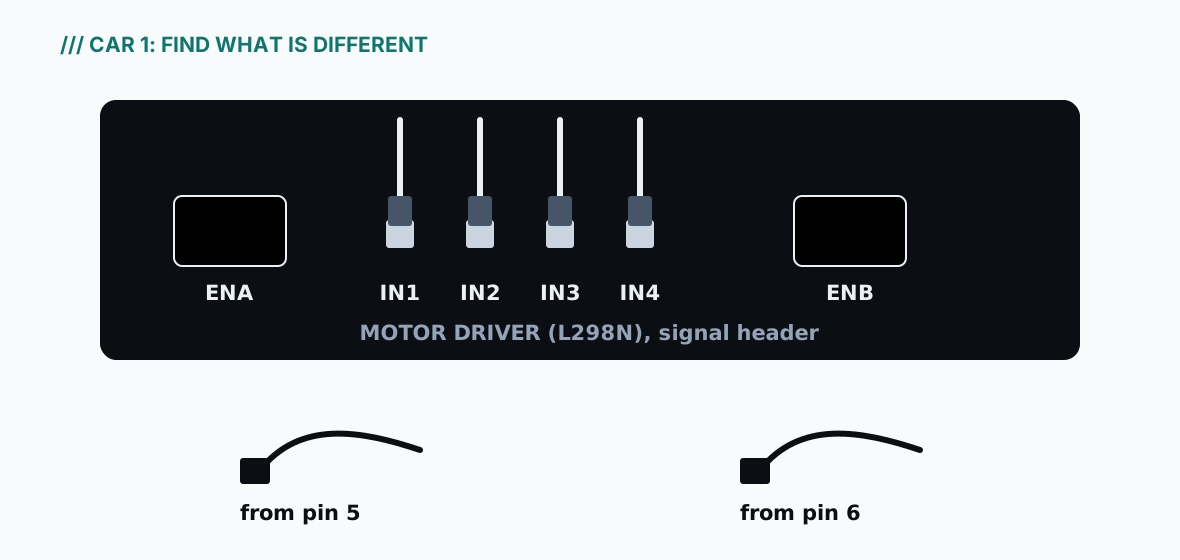
A friend borrowed the car for a weekend. It came back driving fine, but now speeds 1 to 9 all run at the same fast speed. Every direction works. The Serial Monitor shows Got 1 from phone, Got 9 from phone and so on, exactly as it should. The figure shows the motor driver as it came back.
Car 1: the corner of the motor driver with the two speed headers, ENA and ENB, as the car came back.Hint 1 · the box
Direction works and the letters arrive: only the speed half of the wheels box is left.
Hint 2 · the test
Two things can make every speed the same. One of them is visible in the figure.
The answer
The wheels box, the speed half: the jumper caps are back on ENA and ENB. Someone thought they had gone missing and put them back, and the two speed wires were left hanging. A cap ties the speed input to full power, so the motor driver ignores the board. Fix: switch off, pull both caps off, push the speed wires back onto ENA and ENB, and test speed 1 against speed 9.
How sure: Bench-proven that speed varies with the caps off (the original car, August 2026); the caps-on behaviour is from the motor driver’s documentation.
Car 2 · applies to both modules
The right side is dead
“The right side is dead.”
On the box, from the laptop: F turns the left wheels forward and the right wheels not at all. B, L and R do the same: the left side obeys every letter, the right side never moves. Every letter appears in the Serial Monitor. The car was dropped off a table yesterday.
Which parts does only the right side use? List them, then choose the one to check first.
Hint 1 · the box
One side obeys every letter, so the board and the letters are fine.
Hint 2 · the test
The right side alone uses: the ENB wire, the IN3 and IN4 wires, the motor wires in OUT3 and OUT4, and the two right motors. Which can a fall loosen, and which is quickest to check?
The answer
The wheels box, the right side: the right motors’ wires have pulled out of OUT3 and OUT4. Everything that only the right side uses is a suspect: the ENB, IN3 and IN4 wires and the motor wires in OUT3 and OUT4. A fall loosens screw terminals more easily than push-on wires, and a tug test checks them in seconds, so check the terminals first. Fix: switch off, push the wires back in, screw down, tug each one, test.
How sure: Reasoned from the circuit; the other suspects give the same symptom, which is why the tug test comes first and the wires next.
Car 3 · applies to both modules
Backwards, and beeping
“Forward goes backward, and it beeps going forward.”
A new car, just through Stage B. Forward drives it backward, silently. Back drives it forward, beeping. Left turns it right and right turns it left.
Is the board confused, or the wires? The beep tells you. Then decide what to change, and predict what the car will do after your first change, before the second.
Hint 1 · the box
The beep only sounds when the sketch has chosen “back”.
Hint 2 · the test
Compare with Example 1 in Chapter 23: there, one side was flipped. What if both are?
The answer
The wheels box, both sides: both motor pairs are the other way round. The beep sounds on Back, so the sketch chose “back” correctly; the wheels did the opposite. The board is right and the wires are wrong. Fix: switch off, swap red and black on one side (both motors), and test: the car now spins on F, which is progress: it is the signature of one flipped side from Chapter 23. Then swap the other side and test again.
How sure: The beep-on-B is in the sketch (tested on a computer); the rest is reasoned from how a motor reverses.
Car 4 · applies to both modules
Jerks and stops
“It jerks and stops when I type a letter.”
The wheels test. The child types F in the Serial Monitor and presses Enter. The wheels give, at most, a tiny jerk and stop. B, L and R do the same. The car never really moves. The motor driver, the wires and the battery have all been checked twice.
Before you touch a wire: what would you look at, and what would you expect to see there?
Hint 1 · the box
Chapter 24 (your Serial Monitor is a probe), question 3 of the five.
Hint 2 · the test
Look at the line straight after Got F from USB.
The answer
Not a box: the Serial Monitor’s line-ending menu. The Serial Monitor shows Got (newline) from USB straight after every letter. The car obeys the letter for about a thousandth of a second, then the newline counts as “anything else” and stops it. Fix: set the menu to No line ending.
How sure: Tested on a computer; the size of the jerk is not measured.
Car 5 · applies to both modules
Fine with the laptop, dead on the floor
“It works with the laptop, and dies on the floor.”
On the box, with the USB in, the car passed every test, including driving from the phone. The pair skipped the last step of the wheels test. Now the USB is out and the car is on the floor. The holder’s switch is on and the cells are freshly charged. Nothing responds. The board’s ON light is out, and so is the Bluetooth module’s light.
Two boxes look dead at once. What does that tell you?
Hint 1 · the box
Chapter 21: when more than one box looks broken, check the line they share.
Hint 2 · the test
The battery feeds the board through two leads. The wheels test’s last step checks them.
The answer
The power line: the jumper from the motor driver’s +12V screw to the board’s Vin pin (or its partner, GND to GND). Two boxes dark at once means the one thing they share, and the board’s ON light being out says the board has no power; the module gets its power from the board. With the USB in, the laptop fed the board and hid the fault. Fix: switch off; the parent takes the cells out; redo steps B26 and B27 and tug both ends; cells in, switch on; unplug the USB and check the ON light stays lit (the last check of the wheels test).
How sure: The original car needed exactly this lead to run without the USB.
Car 6 · applies to both modules
It used to crawl
“Yesterday speed 1 crawled. Today it just hums.”
Yesterday speed 1 crawled and speed 9 ran. Today, after a long afternoon of driving, speeds 1, 2 and 3 only make the motors hum; the wheels don’t turn. From speed 4 the car moves, but slowly. Every letter arrives in the Serial Monitor, and nobody has touched a wire.
What changed since it last worked?
Hint 1 · the box
Nothing was touched; something was used.
Hint 2 · the test
Speed is the share of time the motors get the battery’s push. What happens to the push itself as cells run down?
The answer
The power line: the cells are tired. What changed was an afternoon of driving. As the cells run down they give less push, so each speed setting delivers less to the motors, and the slowest settings no longer overcome the car’s weight and friction. Don’t leave the motors humming: send S. Then switch off; the parent charges the cells, following the rules in Chapter 5. If it carries on, Chapter 19 explains what a tired battery does next.
How sure: Reasoned from the circuit and the cells’ behaviour; how many speeds stop working depends on your cells and is not measured.
Car 7 · applies to both modules
It drives, but never answers
“It drives, but it never answers.”
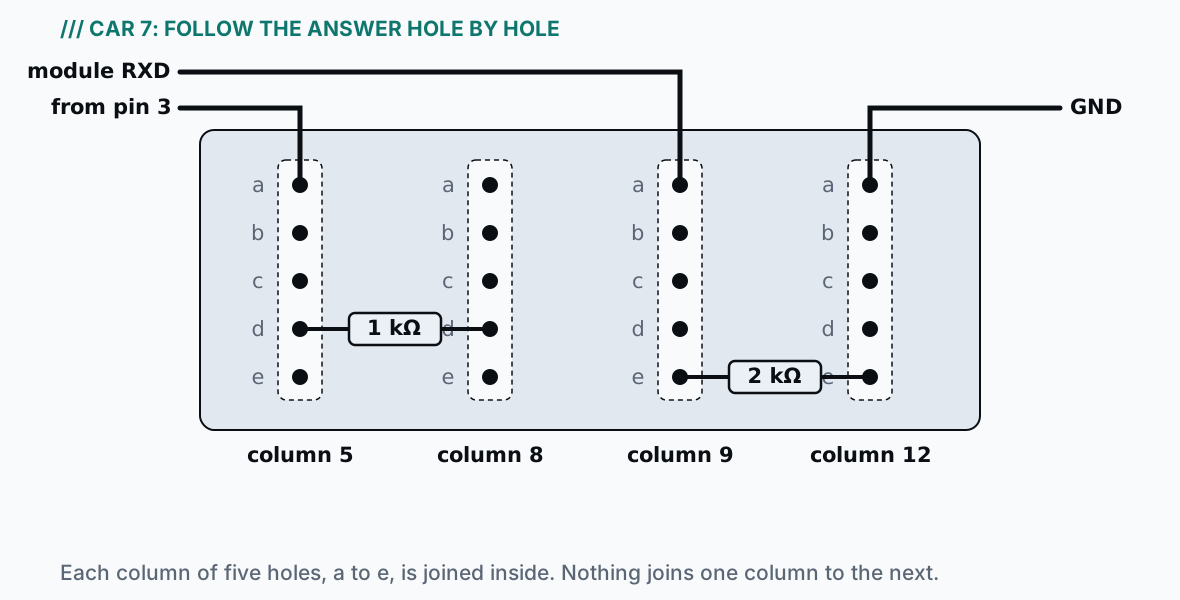
The phone connects. Forward drives the car, and the Serial Monitor shows Got F from phone. But the phone never shows Car heard: F. Typing F in the Serial Monitor turns the wheels, and the phone still shows nothing. The figure shows the two resistors on the breadboard.
Car 7: the two resistors and the module’s listening wire on the breadboard, as found. Each column of five holes is joined inside; nothing joins one column to the next.Hint 1 · the box
Letters arrive; answers don’t. Which direction is broken?
Hint 2 · the test
The answer’s path is pin 3 → column 5 → the 1 kΩ → column 9 → the module’s RXD. Follow it hole by hole in the figure.
The answer
The Bluetooth module’s listening wire: the 1 kΩ resistor’s leg is in the wrong column. Letters arrive, answers don’t, even for a typed letter: the board-to-module direction is broken and nothing else. In the figure, the 1 kΩ’s second leg should be in d9, in column 9 with the 2 kΩ and the RXD wire. It is in d8, a column that nothing else uses, so the board’s answer never reaches the module. Fix: USB out, switch off; move that leg to d9 (step C2 in Chapter 10); test with a typed F.
How sure: Reasoned from the circuit, with the resistors’ values and the sketch’s answer tested on a computer.
Car 8 · applies to both modules
The laptop can, the phone can’t
“The phone can’t drive it, but the laptop can.”
The phone connects, and the module’s light goes steady. Forward does nothing, and no Got F from phone appears. But type F in the Serial Monitor and two things happen: the wheels turn, and the phone shows Car heard: F.
The second half of that is the clue. Which parts has it just cleared?
Hint 1 · the box
The answer reached the phone, so the return path, the module’s power and the radio link all work.
Hint 2 · the test
Only one wire is used by phone-to-board letters and by nothing else.
The answer
The Bluetooth module’s talking wire: TXD has slipped off pin 2. The Car heard: F on the phone proves the board → resistors → module → radio → phone path, and that the module has power. The only part that phone-to-board letters use and nothing else does is the wire from the module’s TXD to pin 2. Fix: USB out, switch off; push it back onto pin 2 (step C7); test from the phone.
How sure: Reasoned from the wiring and the sketch, which is tested on a computer.
Car 9 · applies to both modules
“I updated the sketch”
“I updated the sketch and now it ignores the phone.”
The car drove last week. Since then, someone read a Bluetooth tutorial, changed one line of the sketch and uploaded it. Now the phone connects, but every press of Forward stops the car instead of driving it, and the Serial Monitor fills with lines like Got (code 128) from phone: one or more for every press, and never Got F. Typing F in the Serial Monitor still drives the wheels. This is the changed line:
The hardware has already told you it’s fine. How?
#define BT_BAUD 38400 // the factory speed of the HC-06 and the HM-10
Hint 1 · the box
A line appears for every press: the letters are arriving, so the wires and the radio link work.
Hint 2 · the test
A line arrives for every press, but never the letter you sent. Which setting has to match at both ends, and what does the HC-06 or the HM-10 use out of the box?
The answer
The sketch: BT_BAUD is 38400, and the module talks at 9600. A line appears for every press, so something arrives each time and the wires and radio link work. But it is never the letter that was sent: the two ends disagree about speed. What changed was the sketch. The HC-06 and the DSD TECH HM-10 both talk at 9600 out of the box (their datasheets say so); 38400 is the speed an HC-05, a different module, uses for its setup commands, and tutorials about it are full of that number. Fix: change it back to 9600, upload, test.
How sure: The sketch’s side is tested on a computer and the module speeds are from the datasheets; the exact codes you’d see depend on the letter and are not predicted. (Some HM-10s with newer firmware are reported to start at 115200 instead: the same symptom, on a car nobody has edited. That is a module setting, and Make It Connect covers changing it.)
Car 10 · applies to the HM-10 build. (An iPhone can’t connect to an HC-06 at all; that’s why the book offers the HM-10.)
The iPhone that can’t find it
“My friend’s iPhone can’t find it.”
The car drives perfectly from an Android phone with Chrome. A visiting friend opens the remote page on her iPhone, in Chrome, and presses Connect. No car appears in the list, or the page says Bluetooth isn’t available (the exact words depend on the browser). The car hasn’t changed.
Which box is this, and what does the friend need?
Hint 1 · the box
The car, the module and the remote page all work on Android.
Hint 2 · the test
On an iPhone, which engine is Chrome built on?
The answer
The phone box: the browser. On an iPhone, Chrome is built on the same engine as Safari, and that engine has no Web Bluetooth, the part of a browser the remote page needs to reach the car. Fix: install the free Bluefy browser and open the remote there.
How sure: From the browsers’ published support (checked August 2026 for Make It Connect); recheck when Apple or Google change it.
How these cars were checked
These ten faults were reasoned out, not staged: none of them was set up on a real car for this edition. The motor wiring and the sketch’s letters are the original car’s, which drove for years; the module wiring is checked by compiling and testing the sketch on a computer; each symptom is worked out from the circuit, the sketch and the parts’ datasheets. Each answer says how sure it is.