
Build a Car With Your Kid · Chapter 11
Stage D test: the round trip
Stage D proves the whole journey: the letter arrives at the board, and the board’s answer comes back to the phone. The car stays on its box until this passes. HM-10: open the car remote.
Note
This stage. No new wires. With the car on its box, you watch a letter travel from the phone to the board, and the car's answer come back to the phone. Then the car goes on the floor, and the child drives. The end of the first drive is the last stopping point of Part 1.
Connected, arrived, answered
In Stage C, the phone said connected. That proved the phone and the Bluetooth module can hear each other. Stage D proves two more things, one at a time.
Arrived. When you press Forward, the letter F reaches the board. You see that in the Serial Monitor on the laptop: the board prints Got F from phone.
Answered. The board then answers the phone through the module, and the phone shows Car heard: F. That answer travels from pin 3, through the 1 kΩ resistor, into the module's listening pin. So if the answer arrives, the path through the 1 kΩ resistor is right. The 2 kΩ resistor, the one that protects the module, can't be tested this way: the answer gets through without it. That's why step C9 checks it by eye, hole by hole.
Connected, arrived, answered: three separate facts. When all three are true and the wheels turn, every box in the car works.
The round-trip test
Keep the car on its box for this. Plug in the USB cable and open the Serial Monitor at 9600, so the laptop is your window into the board. Switch on, and connect the phone as in test C2. Then send an F from the phone and watch both screens.
There's a short video of the round trip at troniction.com/go/car-d.
Warning
The car stays on its box until the round-trip test has passed. It will move when the letter arrives.
Car on its box. Switch on. Plug in the USB cable and open the Serial Monitor at 9600.
Connect the phone to the module, as in test C2. The module's light is steady.
With the HM-10 and the remote
Round trip · HM-10 only
On the remote, press and hold Forward for a second, then let go.
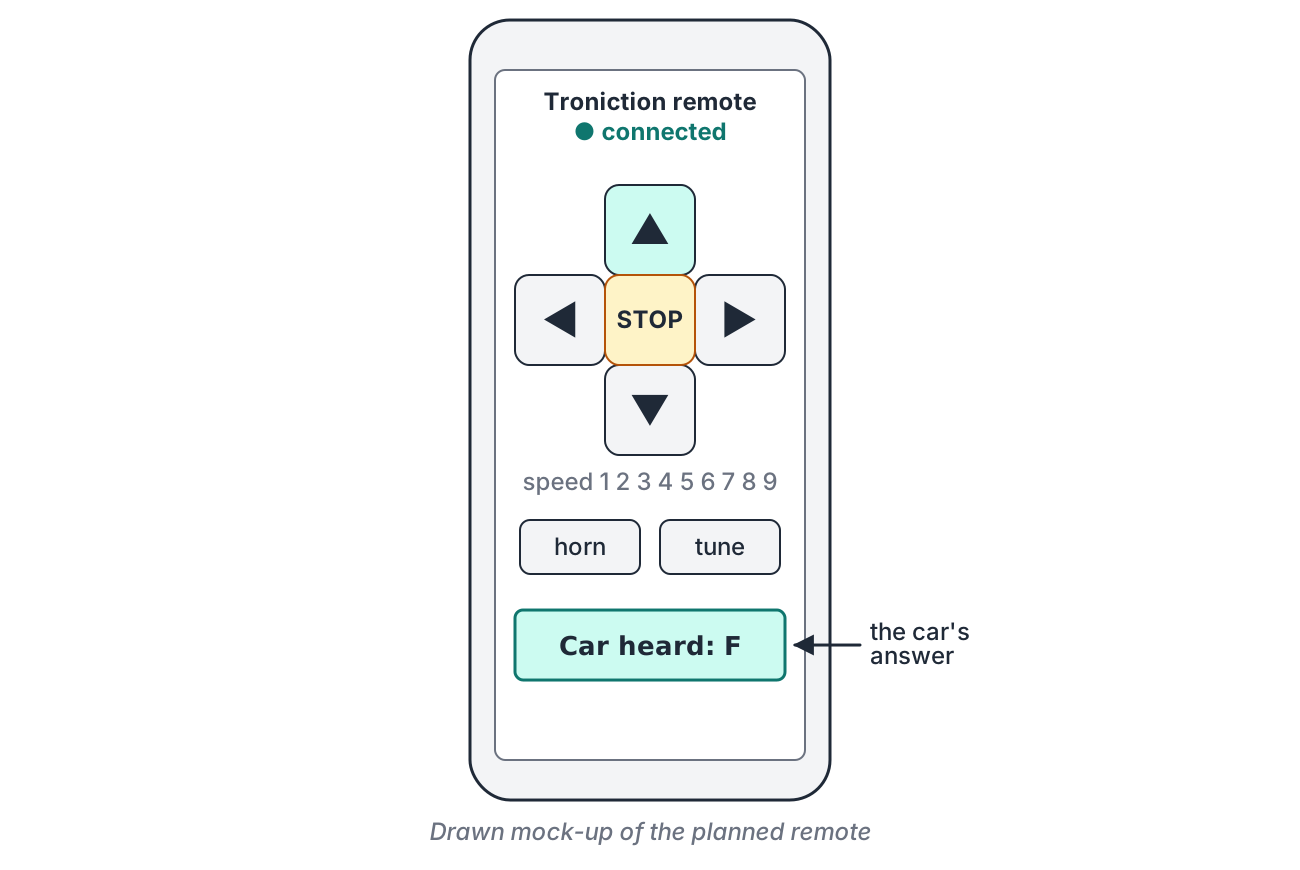
The remote sends F once when you press Forward, and S, stop, when you let go. So you see both letters arrive. If the car doesn't answer Car heard: S, the remote sends the S again, up to twice more, so a stop isn't lost.
With the HC-06 and Serial Bluetooth Terminal
The terminal app normally adds an invisible "new line" letter after everything you send, and to this car any letter it doesn't know means stop. So first, switch that off.
Round trip · HC-06 only
In Serial Bluetooth Terminal, open Settings, then the Send section, and set Newline to None. Go back to the terminal.
Type F in the box at the bottom and tap the send arrow. Then type S and send it.
What you should see
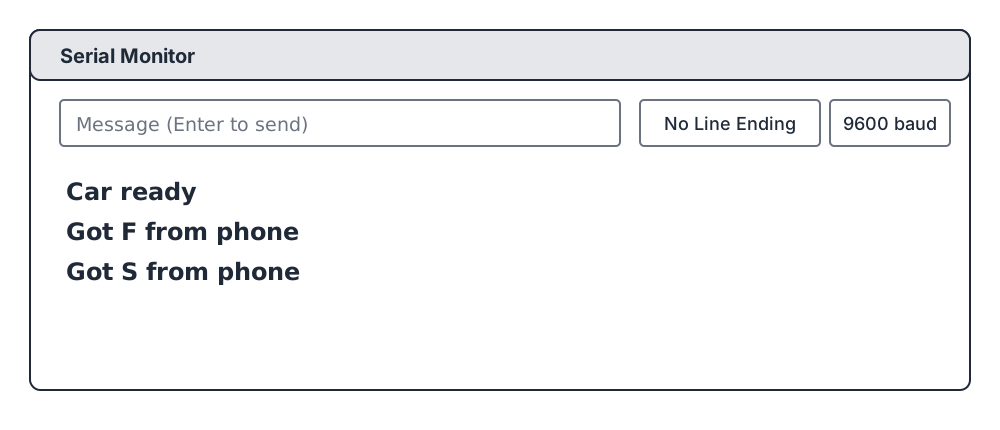
Read both screens aloud: the Serial Monitor on the laptop, and the phone. The parent checks them against the figure.
Test
You should see: the Serial Monitor shows Got F from phone, the phone shows Car heard: F, and the wheels turn forward until the S arrives.
Instead: Got F from phone appears, and the wheels turn, but the phone never shows Car heard.
Meaning: the letter arrives, but the answer doesn't get back. The answer travels from pin 3, through the 1 kΩ resistor, to the module's RXD.
Fix: all power off: unplug the USB cable and switch off. Check the 1 kΩ (C2), the pin 3 wire (C4) and the RXD wire (C8) against the figure in Chapter 10. Then test again.
Instead: the phone is connected, but nothing at all appears in the Serial Monitor.
Meaning: the letter doesn't reach the board. The wire from the module's TXD to pin 2 is missing or on the wrong pin, or TXD and RXD are swapped.
Fix: all power off. Check C7 (TXD to pin 2) and C8 (RXD to a9).
Instead: with an HM-10, the wires check out, but each press shows only a line with an odd code in brackets, such as Got (code …) from phone, and never Got F.
Meaning: the module talks at a different speed from the sketch. The sketch expects 9600, the factory speed of the HM-10. Some HM-10s with newer software (versions V700 to V709) are reported to start at 115200 instead.
Fix: near the top of the sketch, change the module's speed, BT_BAUD, from 9600 to 115200, and upload it again (Chapter 6). If Got F from phone now appears, that was it. The car drives at that speed, but the board can miss a letter now and then. To set the module back to 9600 for good, it needs the setup command AT+BAUD0 (and AT+VERS? reads its software version): Make It Connect has the bridge sketch and the steps, at troniction.com/go/car-mic.
Instead: the letters arrive and are answered, but the wheels don't turn.
Meaning: the phone, the module and the board all work. The problem is in the wheels box or its power.
Fix: is the holder switched on? Then redo the wheels test from Chapter 9.
Talk about it
"The letter came back. Which boxes do we know work now?"
Listen for: all four: the phone, the Bluetooth module, the board and the wheels.
Still stuck
Stop changing things. Run the loop from Chapter 3, out loud: look, which box, change one thing, test again, say what you found. Then go through the full table of symptoms, which starts from the first stage test that fails.
Still stuck after that? Write to [email protected] with the stage test that fails and exactly what you see. If the book turns out to be wrong, it gets a dated correction.
If the car doesn’t move: every symptom, its stage and its fix →The role card and the loop, to print →The stage tests: Stage A · Stage B · Stage C · Stage D